支付与订单状态模型
本页记录了阿哈利姆平台上支付和订单的生命周期:每个状态、每次状态转换,以及支付状态变化如何驱动订单状态变化。 通过本页可以了解哪个 Webhook 在何时触发、玩家何时可以重试,以及如何避免重复扣款或过早撤销权益。
哪些是稳定的、哪些不是
本页描述的 Webhook 事件和 API 状态值属于公开的集成契约。 本页描述的各状态之间的具体中间转换仅出于技术清晰性目的而记录,属于实现细节。 它们可能随着平台的发展而演变。 请针对 Webhook 事件和 API 状态值构建您的集成,而不要针对某个特定的转换图。
概述
阿哈利姆将购买生命周期中的两个实体区分开来:
- 支付(Payment) — 通过支付服务商向玩家扣款的单次尝试。 一个订单可能包含多次支付尝试(例如在一次银行卡被拒之后)。 每次尝试都是一条独立的支付记录。
- 订单(Order) — 逻辑上的购买记录(玩家购买某个商品、礼包或订阅)。 平台会根据支付状态转换更新订单状态。
只有当某笔支付成功、退款完成,或争议以玩家胜诉方式解决时,订单才会终结。
在创建新的支付记录之前,平台会通过将订单从 created(或 reattempted)移动到 captured 来锁定订单。 该锁定可防止同一订单上出现两次并发的支付尝试。
支付生命周期
支付状态
| 状态 | 终态 | Webhook 事件 | 含义 |
|---|---|---|---|
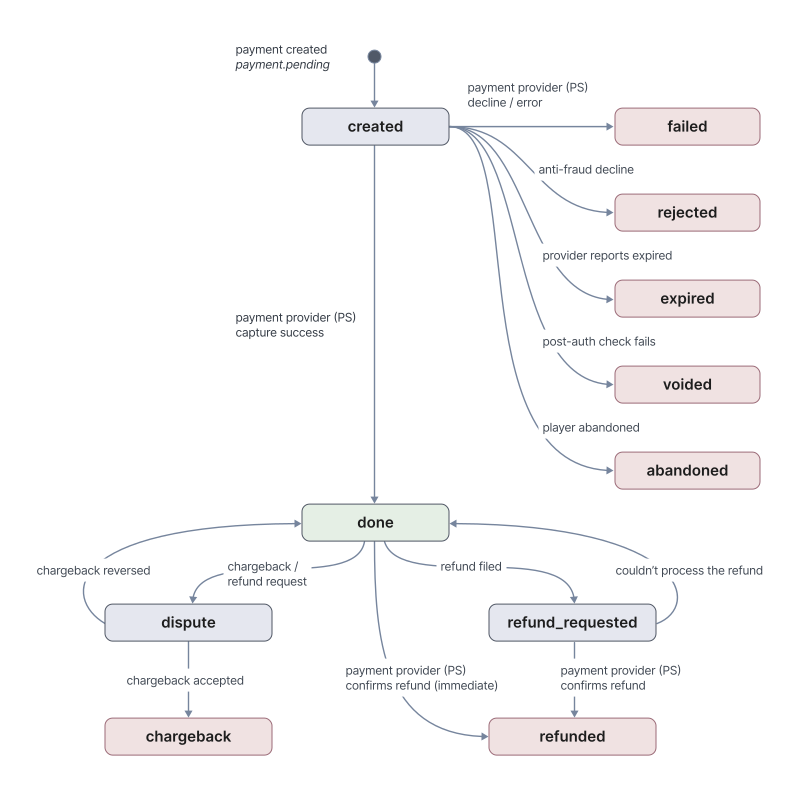
created | 否 | payment.pending | 支付已发起。 玩家已开始交易,阿哈利姆正在等待支付服务商确认结果。 此时会发出 payment.pending。 |
done | 否 | payment.succeeded | 支付成功入账。 之后仍可能转入 dispute 或 refund_requested。 通过争议解决或退款失败恢复而进入 done 时,也会发出 payment.succeeded Webhook —— 请检查负载以进行区分。 |
dispute | 否 | payment.dispute | 针对一笔先前成功的支付发起了退款争议。 解决后会转回 done(商家胜诉,退款争议被驳回)或转入 chargeback(玩家胜诉,退款争议被接受)。 |
refund_requested | 否 | — | 已提交退款申请,但尚未得到支付服务商的确认。 进入此状态时不会发出任何 Webhook。 请等待 payment.refunded(退款完成)或 payment.succeeded(退款无法处理,支付返回 done)。 |
refunded | 是 | payment.refunded | 退款已由支付服务商确认,尽管款项可能尚未返还到玩家账户。 |
failed | 是 | payment.declined | 支付在处理过程中被拒或出错。 |
expired | 是 | payment.expired | 支付服务商报告该支付已过期,因为未在规定时间内完成。 只有当服务商报告(通过 Webhook 或状态轮询)时,阿哈利姆才会将支付移动到 expired;否则支付保持在 created。 |
voided | 是 | payment.voided | 支付已授权但在入账前被作废,通常是由于授权后检查(国家不匹配、反欺诈)。 |
rejected | 是 | payment.rejected | 支付在提交前被拒绝,通常由反欺诈系统拒绝。 |
abandoned | 是 | payment.abandoned | 玩家明确停止了支付流程(关闭页面、取消或点击返回)。 与 expired 不同,expired 是支付服务商在支付未及时完成时报告的。 |
chargeback | 是 | payment.chargeback | 支付因玩家赢得退款争议而被取消。 款项已经或将由玩家所在银行返还给玩家。 |
支付状态转换
| 从 | 到 | 原因 | 终态 |
|---|---|---|---|
created | done | 支付服务商确认成功入账 | 否 |
created | failed | 支付服务商拒绝支付或返回错误 | 是 |
created | rejected | 反欺诈拒绝支付 | 是 |
created | expired | 支付服务商报告支付已过期(通过 Webhook 或状态轮询) | 是 |
created | voided | 授权后检查失败(国家不匹配、反欺诈) | 是 |
created | abandoned | 玩家明确停止了支付流程 | 是 |
done | dispute | 针对一笔成功的支付发起了退款争议或退款申请 | 否 |
done | refund_requested | 已提交退款申请,但待支付服务商确认 | 否 |
done | refunded | 支付服务商立即确认退款 | 是 |
refund_requested | refunded | 支付服务商确认待处理的退款 | 是 |
refund_requested | done | 退款无法处理 | 否 |
dispute | done | 退款争议被驳回(商家成功抗辩争议) | 否 |
dispute | chargeback | 退款争议被银行接受 | 是 |
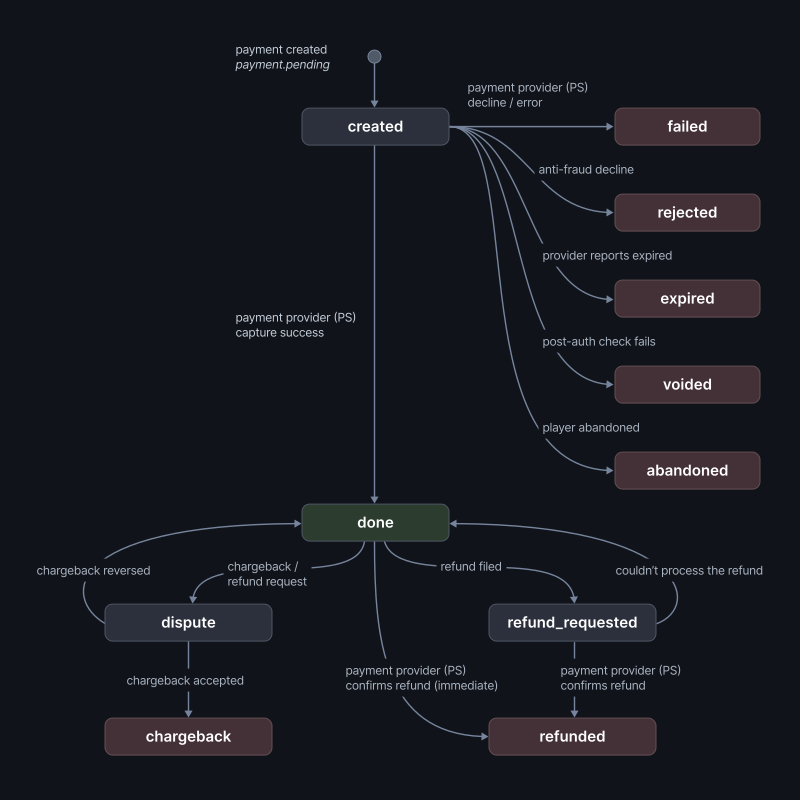
支付状态图
订单生命周期
您的集成可见的订单状态值:
| 状态 | 终态 | 含义 |
|---|---|---|
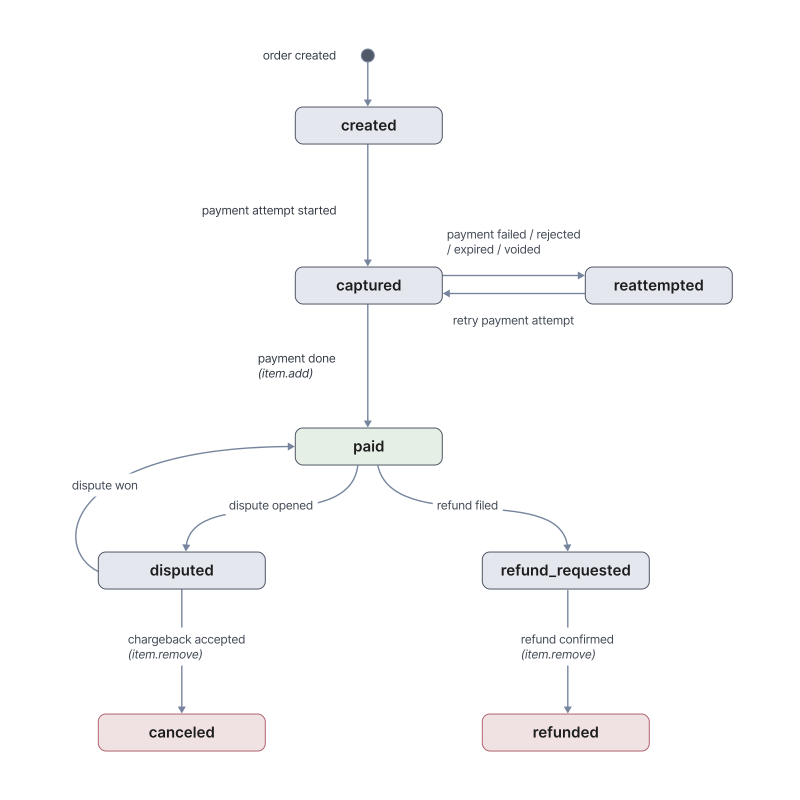
created | 否 | 订单已创建。 尚未开始任何支付尝试。 |
captured | 否 | 一次支付尝试正在进行中。 订单已被锁定以防止并行支付尝试。 |
reattempted | 否 | 上一次支付尝试以非终态方式失败。 订单已开放以进行新的支付尝试。 |
paid | 否 | 该订单上的一笔支付已成功。 订单进入交付流程。 |
disputed | 否 | 该订单上的一笔支付正处于争议中。 |
refund_requested | 否 | 已提交退款申请。 |
refunded | 是 | 退款已完成。 |
canceled | 是 | 通过已解决的争议达到此状态。 |
支付状态如何驱动订单状态
订单状态变化由支付状态转换触发:
| 支付状态转换 | 订单状态 | 影响 |
|---|---|---|
| (在创建支付记录之前) | created 或 reattempted → captured | 订单被锁定以防止并发支付尝试 |
created → done | captured → paid | 触发 item.add |
created → failed | captured → reattempted | 玩家可重试 |
created → rejected | captured → reattempted | 玩家可重试 |
created → expired | captured → reattempted | 玩家可重试 |
created → voided | captured → reattempted | 玩家可重试 |
created → abandoned | captured → reattempted | 玩家可重试 |
done → dispute | paid → disputed | 争议流程 |
done → refund_requested | paid → refund_requested | 退款待处理 |
done / refund_requested → refunded | → refunded | 终态;触发 item.remove |
dispute → chargeback | disputed → canceled | 终态;触发 item.remove |
dispute → done | disputed → paid | 争议已解决;权益保留 |
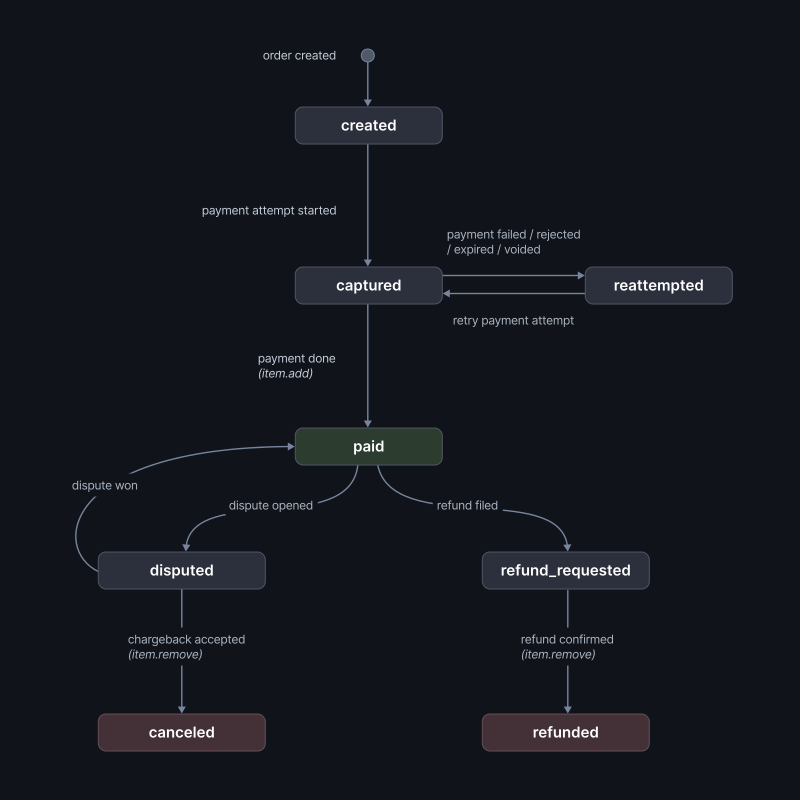
订单状态图
生命周期中发出的 Webhook
上述状态转换会驱动向您的集成投递的 Webhook:
payment.pending—— 当支付进入created(玩家开始交易)时发出。payment.succeeded—— 在三种不同的状态转换中触发:正常成功路径(created → done)、争议以玩家败诉方式解决(dispute → done),以及无法处理的退款(refund_requested → done)。 从此事件汇总收入的集成应检查负载,以避免对恢复场景进行重复计数。payment.chargeback—— 在dispute → chargeback时触发,即玩家赢得退款争议。 款项已经或将由玩家所在银行返还给玩家。payment.abandoned—— 当支付进入abandoned(玩家明确停止了支付流程)时触发。 与payment.expired不同,后者是支付服务商在支付未及时完成时报告的。- 当支付进入
refund_requested时不会发出任何 Webhook。 请监听最终的解决结果:如果退款完成则为payment.refunded,如果退款无法处理则为payment.succeeded。 item.add—— 仅在成功路径上发出:当支付从created → done转换且订单移动到paid时。item.remove—— 在两种终态订单结果时发出:当订单到达refunded时(涵盖refund_requested → refunded),以及disputed → canceled时(退款争议被接受)。 发起争议(paid → disputed)和提交退款申请(paid → refund_requested)不会发出item.remove—— 只有终态解决结果才会。- 以
failed、rejected、expired或voided结束的支付不会产生item.add。 订单返回reattempted,玩家可以重试。
要让玩家完成购买,其某次支付尝试必须到达 done。 所有其他终态都会使订单保持开放以供再次尝试。 一旦支付处于 done,只有 → refunded 或 disputed → canceled 才会通过 item.remove 撤销权益。
实践指南
某些支付方式 —— 电信运营商计费、某些电子钱包,以及特定流程中的 PayPal —— 可能会在支付服务商确认结果之前,将支付保持在 created 状态数分钟甚至更久。 为正确处理这些流程并避免重复扣款或过早撤销权益,您的集成应:
- 将
payment.pending视为向玩家显示购买正在进行中的信号,并在您的客户端中阻止对同一商品的重复购买尝试。 - 如果
item.add未在合理时间内到达(大多数支付方式为 10–20 分钟),请使用结账时返回的order_id调用 Get Order 以检查当前订单状态。 - 在以下任一情况发生时解除阻止:
item.add到达 —— 支付已成功。- 失败 Webhook 到达 ——
payment.declined、payment.expired、payment.voided、payment.rejected或payment.abandoned。 本次尝试已结束,订单返回reattempted,因此玩家可以重试。 - 订单到达终态(
refunded或canceled)。
- 将
item.remove视为撤销权益的唯一信号。 不要在paid → disputed或paid → refund_requested时撤销 —— 两者都可能被逆转(争议可能胜诉,退款可能被拒绝),玩家会保留商品。 - 所有阿哈利姆 Webhook 投递都携带一个
idempotency_key。 请用它在您这一侧对重复投递进行去重。 完整契约请参阅 幂等性。
需要技术支持?
联系我们的集成技术团队: [email protected]