玩家身份验证 Webhook
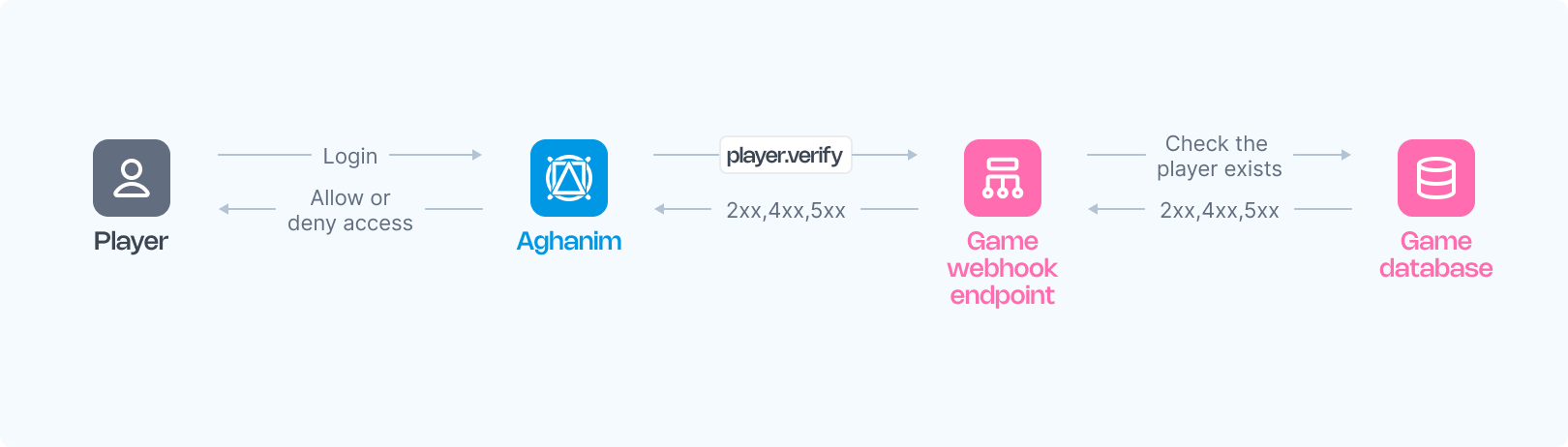
阿哈利姆通过玩家身份验证 Webhook 机制,在玩家尝试登录游戏枢纽时,向您的游戏服务器发送验证请求,您的服务器需要验证玩家身份并明确响应是允许还是拒绝其访问权限。 本文档将详细介绍玩家身份验证 Webhook 的实现方法。
该 Webhook 负责验证玩家在您游戏系统中的注册状态,不仅在初次登录时触发,还可能在玩家 session 过期或进行重要操作时被多次调用。
要求
如需正确实现阿哈利姆的玩家身份验证系统,请按照以下要求配置您的 Webhook 服务器:
- HTTPS 端点,可接收 POST Webhook 请求。
- 监听由阿哈利姆生成并 签名 的事件。
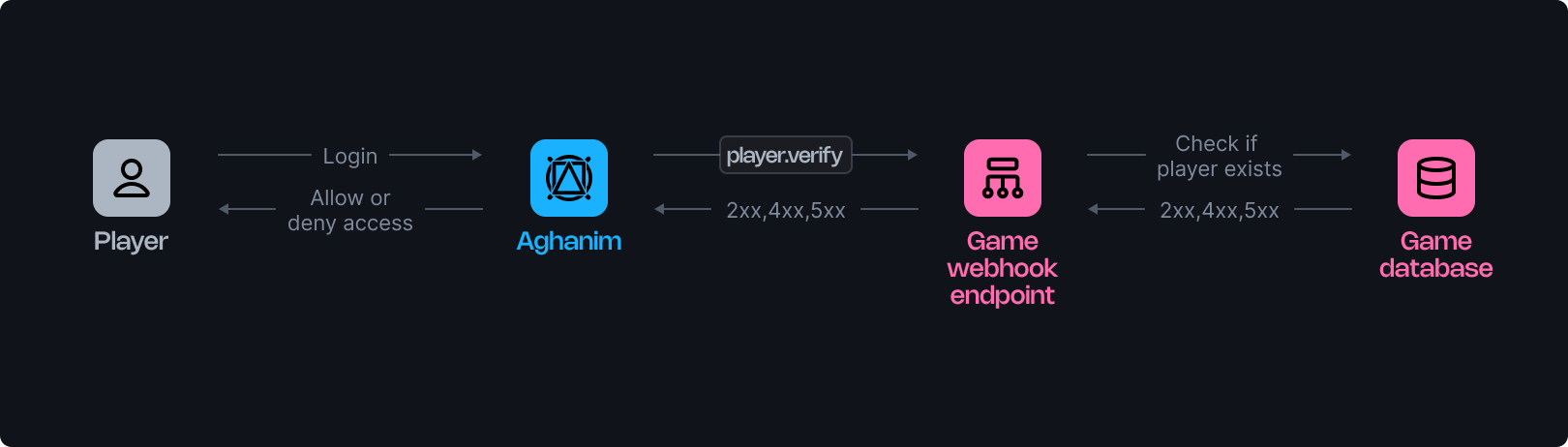
- 接收请求后,根据传入的 玩家 ID 参数查询您的游戏数据库,验证玩家身份并决定是否授予其访问 Game Hub 的权限。
- 对于验证通过的情况,返回 2xx 系列状态码和对应的 JSON 响应负载 以表示批准;对于验证未通过的情况,返回包含错误负载的 4xx 状态码 以表示拒绝;对于 服务器错误,返回 5xx。
配置步骤
以下是用于处理阿哈利姆发送的玩家验证请求的服务端函数示例框架:
- Python
- Ruby
- Node.js
- Go
import fastapi, hashlib, hmac, json, typing
from fastapi.responses import JSONResponse

app = fastapi.FastAPI()

@app.post("/webhook")
async def webhook(request: fastapi.Request) -> dict[str, typing.Any]:
    secret_key = "<YOUR_S2S_KEY>"  # 请替换为您的实际 Webhook Secret Key

    raw_payload = await request.body()
    payload = raw_payload.decode()
    timestamp = request.headers["x-aghanim-signature-timestamp"]
    received_signature = request.headers["x-aghanim-signature"]

    if not verify_signature(secret_key, payload, timestamp, received_signature):
        raise fastapi.HTTPException(status_code=403, detail="Invalid signature")

    data = json.loads(payload)
    event_type = data["event_type"]
    event_data = data["event_data"]

    if event_type == "player.verify":
        player_data = verify_player(event_data)
        if not player_data:
            return JSONResponse(
                status_code=404,
                content={"status": "error", "code": "not_found", "message": "Player does not exist"},
            )
        return player_data

    raise fastapi.HTTPException(status_code=400, detail="Unknown event type")

def verify_signature(secret_key: str, payload: str, timestamp: str, received_signature: str) -> bool:
    signature_data = f"{timestamp}.{payload}"
    computed_hash = hmac.new(secret_key.encode(), signature_data.encode(), hashlib.sha256)
    computed_signature = computed_hash.hexdigest()
    return hmac.compare_digest(computed_signature, received_signature)

def verify_player(event_data: dict[str, typing.Any]) -> dict[str, typing.Any]:
    # 用于获取玩家数据的示例占位代码。
    # 在实际应用中,此函数将与您的数据库或用户管理系统进行交互。
    return {
        "player_id": "r2d2-c3po",
        "name": "Molly",
        "attributes": {"level": 2},
        "country": "US"
    }
require 'sinatra'
require 'json'
require 'openssl'

post '/webhook' do
  secret_key = "<YOUR_S2S_KEY>"  # 请替换为您的实际 Webhook Secret Key

  payload = request.body.read
  timestamp = request.env["HTTP_X_AGHANIM_SIGNATURE_TIMESTAMP"]
  received_signature = request.env["HTTP_X_AGHANIM_SIGNATURE"]

  unless verify_signature(secret_key, payload, timestamp, received_signature)
    halt 403, "Invalid signature"
  end

  data = JSON.parse(payload)
  event_type = data["event_type"]
  event_data = data["event_data"]

  if event_type == "player.verify"
    player_data = fetch_player_data(event_data)
    if player_data.nil?
      content_type :json
      halt 404, { status: "error", code: "not_found", message: "Player does not exist" }.to_json
    end
    return player_data.to_json
  end

  halt 400, "Unknown event type"
end

def verify_signature(secret_key, payload, timestamp, received_signature)
  signature_data = "#{timestamp}.#{payload}"
  computed_signature = OpenSSL::HMAC.hexdigest('sha256', secret_key, signature_data)
  OpenSSL.secure_compare(computed_signature, received_signature)
end

def fetch_player_data(event_data)
  # 用于获取玩家数据的示例占位代码。
  # 在实际应用中,此函数将与您的数据库或用户管理系统进行交互。
  { player_id: "r2d2-c3po", name: "Molly", attributes: { level: 2 }, country: "US" }
end
const express = require('express');
const crypto = require('crypto');

const app = express();

app.post('/webhook', express.raw({ type: "*/*" }), async (req, res) => {
  const secretKey = '<YOUR_S2S_KEY>'; // 请替换为您的实际 Webhook Secret Key

  const rawPayload = req.body;
  const timestamp = req.headers['x-aghanim-signature-timestamp'];
  const receivedSignature = req.headers['x-aghanim-signature'];

  if (!verifySignature(secretKey, rawPayload, timestamp, receivedSignature)) {
    return res.status(403).send('Invalid signature');
  }

  const payload = JSON.parse(req.body);
  const { event_type, event_data } = payload;

  if (event_type === 'player.verify') {
    const playerData = fetchPlayerData(event_data);
    if (!playerData) {
      return res.status(404).json({ status: 'error', code: 'not_found', message: 'Player does not exist' });
    }
    return res.json(playerData);
  }

  return res.status(400).send('Unknown event type');
});

function verifySignature(secretKey, payload, timestamp, receivedSignature) {
  const signatureData = `${timestamp}.${payload}`;
  const computedSignature = crypto
    .createHmac('sha256', secretKey)
    .update(signatureData)
    .digest('hex');
  return crypto.timingSafeEqual(Buffer.from(computedSignature), Buffer.from(receivedSignature));
}

function fetchPlayerData(event_data) {
  // 用于获取玩家数据的示例占位代码。
  // 在实际应用中,此函数将与您的数据库或用户管理系统进行交互。
  return {
    player_id: 'r2d2-c3po',
    name: 'Molly',
    attributes: { level: 2 },
    country: 'US'
  };
}
package main

import (
  "crypto/hmac"
  "crypto/sha256"
  "encoding/hex"
  "encoding/json"
  "fmt"
  "io/ioutil"
  "net/http"
)

func webhookHandler(w http.ResponseWriter, r *http.Request) {
  secretKey := "<YOUR_S2S_KEY>"  // 请替换为您的实际 Webhook Secret Key

  rawPayload, _ := ioutil.ReadAll(r.Body)
  payload := string(rawPayload)
  timestamp := r.Header.Get("X-Aghanim-Signature-Timestamp")
  receivedSignature := r.Header.Get("X-Aghanim-Signature")

  if !verifySignature(secretKey, payload, timestamp, receivedSignature) {
    http.Error(w, "Invalid signature", http.StatusForbidden)
    return
  }

  var data map[string]interface{}
  if err := json.Unmarshal(rawPayload, &data); err != nil {
    http.Error(w, "Invalid payload", http.StatusBadRequest)
    return
  }

  eventType := data["event_type"].(string)
  eventData := data["event_data"].(map[string]interface{})

  if eventType == "player.verify" {
    playerData := verifyPlayer(eventData)
    if playerData == nil {
      w.Header().Set("Content-Type", "application/json")
      w.WriteHeader(http.StatusNotFound)
      json.NewEncoder(w).Encode(map[string]string{
        "status":  "error",
        "code":    "not_found",
        "message": "Player does not exist",
      })
      return
    }
    json.NewEncoder(w).Encode(playerData)
    return
  }

  http.Error(w, "Unknown event type", http.StatusBadRequest)
}

func verifySignature(secretKey, payload, timestamp, receivedSignature string) bool {
  signatureData := fmt.Sprintf("%s.%s", timestamp, payload)
  mac := hmac.New(sha256.New, []byte(secretKey))
  mac.Write([]byte(signatureData))
  computedSignature := hex.EncodeToString(mac.Sum(nil))
  return hmac.Equal([]byte(computedSignature), []byte(receivedSignature))
}

func verifyPlayer(eventData map[string]interface{}) map[string]interface{} {
  // 用于获取玩家数据的示例占位代码。
  // 在实际应用中,此函数将与您的数据库或用户管理系统进行交互。
  return map[string]interface{}{
    "player_id": "r2d2-c3po",
    "name": "Molly",
    "attributes": map[string]interface{}{"level": 2},
    "country": "US",
  }
}
当您的函数准备就绪后:
- 部署您的端点使其可访问。
- 在Aghanim账户中注册您的端点 → Game → Webhooks → New Webhook,选择玩家验证事件类型。
或者,您也可以使用 Create Webhook API 方法在阿哈利姆中注册您的端点。
触发值
| 值 | 描述 |
|---|---|
hub.login | 当玩家打开游戏中心时。 |
hub.interact | 后台重新验证,在玩家上次访问 hub 后每 6 小时触发一次。 |
hub.purchase | 当玩家点击商店中的购买按钮以确认是否根据玩家属性该商品仍然可用时。仅当商店商品设置了细分规则时才会触发。 |
hub.store.open | 当商店打开时。仅当商店规则包含 verify_player 操作时才会触发。 |
order.captured | 在支付处理开始前。仅当商店商品设置了细分规则时才会触发。 |
s2s.user.authorize | 对新创建用户的首次 S2S authorize 调用时。对同一用户的后续调用不会发送 webhook。 |
s2s.player.issue_loyalty_points | 对新创建用户的首次 S2S 忠诚积分发放时。对同一用户的后续调用不会发送 webhook。 |
liveops.execute_action | 当执行 LiveOps 操作时。 |
test | 在 Dashboard 中使用 "Send test event" 时。 |
有关 player.verify 与其他事件类型的关系,请参阅完整的事件与触发器对照表。
Request Schema
下面是一个 player.verify Webhook 请求示例:
- HTTP
- cURL
POST /your/webhook/uri HTTP/1.1
Content-Type: application/json
Host: your-webhook-endpoint.com
User-Agent: Aghanim/0.1.0
X-Aghanim-Signature: 2e45ed4dede5e09506717490655d2f78e96d4261040ef48cc623a780bda38812
X-Aghanim-Signature-Timestamp: 1725548450

{
  "event_type": "player.verify",
  "event_data": {
    "player_id": "2D2R-OP3C"
  },
  "event_time": 1725548450,
  "event_id": "whevt_eCacGbJVbvToOgzjXUgOCitkQE",
  "idempotency_key": null,
  "request_id": "d1593e9c-c291-4004-8846-6679c2e5810b",
  "sandbox": false,
  "trigger": "hub.login",
  "transaction_id": "whtx_eCacGbJVbvT",
  "context": null,
  "game_id": "gm_exTAyxPsVwh"
}
curl "https://your-webhook-endpoint.com/your/webhook/uri" \
    -X POST \
    -H "Content-Type: application/json" \
    -H "User-Agent: Aghanim/0.1.0" \
    -H "X-Aghanim-Signature: 2e45ed4dede5e09506717490655d2f78e96d4261040ef48cc623a780bda38812" \
    -H "X-Aghanim-Signature-Timestamp: 1725548450" \
    -d '{
      "event_type": "player.verify",
      "event_data": {
        "player_id": "2D2R-OP3C"
      },
      "event_time": 1725548450,
      "event_id": "whevt_eCacGbJVbvToOgzjXUgOCitkQE",
      "idempotency_key": null,
      "request_id": "d1593e9c-c291-4004-8846-6679c2e5810b",
      "sandbox": false,
      "trigger": "hub.login",
      "transaction_id": "whtx_eCacGbJVbvT",
      "context": null,
      "game_id": "gm_exTAyxPsVwh"
    }'
事件 Schema
| 键名 | 类型 | 描述 |
|---|---|---|
event_id | string | 阿哈利姆生成的唯一事件标识符。 |
game_id | string | 您的游戏在阿哈利姆中的唯一标识符。 |
event_type | string | 事件的类型, player.verify 在此情境下。 |
event_time | number | The time the event was sent, in Unix epoch time. May differ across duplicate deliveries of the same event. |
event_data | EventData | 包含事件特定数据的字段,其中可能包含用于继承对象的各种键值。 |
idempotency_key | string|null | 即使出现重试情况,也能确保 Webhook 操作只执行一次。 可以是 null 具体取决于事件类型。 |
request_id | string|null | 如果事件是通过 API 请求触发的,此字段将包含对应的请求 ID。 |
sandbox | boolean | 标识事件是否来自沙盒测试环境的指示器。 |
trigger | string|null | 触发该事件发送的触发器。 |
transaction_id | string | 阿哈利姆生成的交易标识符。在同一交易过程中触发的多个事件可能共享相同的交易 ID。 |
context | object|null | 事件的相关上下文信息。 |
EventData Schema
| 键名 | 类型 | 描述 |
|---|---|---|
player_id | string | 用于玩家身份验证的唯一 玩家 ID。 |
Response Schema
在收到 player.verify webhook 后,您的服务器必须返回适当的 HTTP 状态码和 JSON 响应负载。
成功响应
当玩家验证成功时,返回 2xx 状态码,并在 JSON 响应负载中包含玩家数据:
| 键名 | 类型 | 描述 | 是否必需 |
|---|---|---|---|
player_id | string | 用于玩家身份验证的唯一 玩家 ID。 | 是 |
name | string | 玩家昵称。 | 是 |
attributes | Attributes | 阿哈利姆需要的基本玩家属性。 | 是 |
avatar_url | string | 玩家头像图片的 URL。 | 否 |
email | string | 玩家的电子邮件地址。 | 否 |
banned | boolean | 表示该玩家是否被封禁。 | 否 |
segments | string[] | 玩家所属的玩家分群列表。 | 否 |
country | string | 根据 ISO 3166-1 标准的两位国家代码。 | 否 |
custom_attributes | CustomAttributes | 自定义玩家属性。 | 否 |
balances | Balance[] | 玩家当前各类游戏虚拟货币的持有量。 | 否 |
banned 是粘性标志banned 标志是粘性的:一旦您返回 banned: true,玩家将保持被标记状态,直到您显式返回 banned: false。 在后续响应中省略该字段不会清除它(此为设计行为)。
Balance 对象结构
Balance 对象包含以下属性字段:
| 键名 | 类型 | 描述 | 是否必需 |
|---|---|---|---|
sku | string | 虚拟货币的唯一标识符,必须在游戏系统和阿哈利姆上保持一致。 | 是 |
quantity | number | 玩家当前持有的该种虚拟货币余额。 | 是 |
Attributes 对象结构
Attributes 对象可以包含以下标准属性字段:
| 键名 | 类型 | 描述 | 是否必需 |
|---|---|---|---|
level | number | 玩家在游戏中的当前等级或进度级别。 | 是 |
platform | string | 玩家访问游戏枢纽的设备平台类型。 可选值:ios、android。 | 否 |
marketplace | string | 玩家下载游戏的应用市场或分发渠道。 可选值:app_store、google_play、other。 | 否 |
soft_currency_amount | number | 玩家当前持有的游戏代币(通常免费获取)余额。 | 否 |
hard_currency_amount | number | 玩家当前持有的充值货币(通常购买获得)余额。 | 否 |
CustomAttributes 对象结构
CustomAttributes 对象包含您定义的自定义键值对数据,例如:
{
  "is_premium": true,
  "age": 25,
  "favorite_color": "blue",
  "install_date": 1704070800
}
您可以利用这些自定义属性在 LiveOps 活动 和 玩家分群 中创建精准的目标受众条件,实现个性化内容推送和精细化营销。
重要说明:在使用自定义属性前,您必须先在 游戏 → 玩家属性 中定义这些属性的名称和数据类型。
验证成功的响应示例
{
  "player_id": "2D2R-OP3C",
  "name": "Beebee-Ate",
  "avatar_url": "https://static-platform.aghanim.com/images/bb8.jpg",
  "attributes": {"level": 2},
  "country": "US"
}
错误响应
当玩家验证失败时,您的服务器必须返回 4xx 状态码,并使用以下 JSON 结构:
{
  "status": "error",
  "code": "<error_code>",
  "message": "<optional human-readable description>"
}
HTTP 状态码决定了 Aghanim 如何处理该响应。 code 字段进一步确定应用哪种失败情况——它会首先与已识别的代码进行匹配——而 message(如果存在)会覆盖向玩家显示的文本。 若 4xx 响应没有有效的 JSON 正文或没有已识别的 code,则会被视为基础设施级错误,并且不会强制登出(参见下表后的说明)。
| HTTP 状态码 | 代码 | 描述 | Hub 行为 |
|---|---|---|---|
403 | banned | 玩家在游戏中被封禁。 | 强制登出。 玩家看到:“您的游戏账号已被停用。” |
404 | not_found | 玩家不存在。 | 强制登出。 玩家看到:“未找到您的游戏账号。 请通过游戏重新登录。” |
410 | deleted | 该玩家此前存在,但已被删除。 | 强制登出。 玩家看到:“您的游戏账号不再处于活跃状态。” |
422 | not_eligible | 玩家未满足访问 Hub 的要求(例如等级、游玩时长、已完成的任务)。 | 强制登出。 玩家看到:“您尚未解锁 Hub。 继续游玩以获得访问权限!” |
错误响应示例
{
  "status": "error",
  "code": "banned",
  "message": "Player is banned"
}
{
  "status": "error",
  "code": "not_eligible",
  "message": "Player has not reached the required level"
}
Aghanim 仅对携带有效 JSON 正文且包含上表中已识别 code 的 4xx 响应执行强制登出。 如果响应正文不是有效的 JSON、省略了 code、或包含无法识别的 code(例如 Cloudflare、WAF 或反向代理返回的 HTML 错误页面),Aghanim 会将其视为基础设施级错误,并且不会强制玩家登出:登录时玩家将被拒绝进入,而在后台重新验证期间不会执行任何操作。
服务器错误
仅在发生意外的服务端故障时(例如数据库不可用、内部异常)返回 5xx 状态码。 不要使用 5xx 状态码来传达玩家级别的验证结果。 player.verify webhook 以单次尝试同步发送:Aghanim 不会重试收到 5xx 响应的 player.verify 请求,5xx 会拒绝该次验证但不会强制登出。
需要技术支持?
联系我们的集成技术团队: [email protected]